Posts

Showing posts with the label placement

Review: Help Me Fly for iPhone and iPad

Image
Help Me Fly by Funtomic is a casual puzzle game whose difficulty level pleasantly surprised me. The primary goal of the game is to rearrange the position of the red pieces, forming a continuous path from the battery to the plane. The secondary goal is to also connect the path to the stars (the number of stars changes from puzzle to puzzle). When you solve a puzzle, you get a nice animation of the plane flying away in circles. Normally the pieces can only be dragged around; the pieces with an arrow on them can also be rotated. Finding a route to the plane is easy enough, but also connecting all the stars required me several attempts in many cases. The solutions are elusive, possibly also for psychological reasons. For example in the puzzle pictured above, laying down a path to either the star or the plane is trivial, but to connect both of them you always seem to be one cell short, until you figure out that you are approaching the puzzle from the wrong direction. The game currently con...
Review: FlowDoku for iPhone and iPad

Image
Just when you thought that Sudoku had been beaten to death, here comes FlowDoku by HapaFive Games, which turns the concept on its head to produce an excitingly original new puzzle. To be clear, the only thing this game shares with Sudoku is the basic premise of placing symbols on a grid so that certain requirements are met on every row, column, and box. That's pretty much the end of similarities. In Sudoku you have 9 different symbols, which must not be repeated; in FlowDoku, you have a smaller number of symbols, some of which must be repeated a given number of times. The second rule is the stroke of genius: the symbols that appear multiple times in a box, must be next to each other. This second rule makes the solving strategies very different from Sudoku, and allows for a great variety of logic deductions. At the beginning of each puzzle you have a number of givens; it goes without saying that there is only one way to fill the grid following the rules. So e.g. you need to get f...

Review: Reiner Knizia's Kaleidoscope for iPhone and iPad

Image
Reiner Knizia's Kaleidoscope is a nice variation of domino placement puzzles, flawed by a mediocre user interface. Whether Reiner Knizia was actually involved in the design of these puzzles, or his name is just used for marketing purposes, is unclear to me. The game uses the same double-hexagon domino pieces of Knizia's Ingenious (marketed as Kaleidoskop in some countries), but that's a totally different game. There are six symbols, and 21 domino pieces showing all the possible pairs of symbols. The playing area is a hexagonal grid, which in each puzzle is populated by a different pattern of symbols. You must place all the 21 pieces on the board, matching the existing symbols. Each puzzle has only one solution. When you tap a piece on the right, the places where it can be moved are highlighted. This is helpful because to find the solution you only want to place a piece when you are sure of its position. If you try to drag the piece over the board, which would be the nat...

Update: Lazors 2.2

Image
An update to the popular Lazors was released a few days ago, featuring 5 new groups of puzzles with cleverly thought themes, for a total of 50 new puzzles. Numbered features grids shaped like the numbers 1 to 10, and each puzzle even has a matching number of blocks! Grande contains grids larger than average. I found these puzzles to be the hardest of new ones. Tinier has the smallest grids in the game. These are so small that it's easy to stumble on the solution by accident. Glassware only uses glass and crystal blocks. Elementary is a set of puzzles all using the 4 "elements" of the game, that is one of each kind of block. The new puzzles are all entertaining as usual, so if you deleted the game from your device for some reason, it's time to download it again. ©2013 Nicola Salmoria. Unauthorized use and/or duplication without express and written permission is strictly prohibited. Excerpts and links may be used, provided that full and clear credit is given to Nico...

Strategy Guide: Stickets

Image
Lately I've been not only playing Stickets a lot, but also thinking about it as an example of a very well designed game. Just a few days ago, Raf Peeters was kind enough to share with me some insight about how puzzles which are enjoyable in physical form don't necessarily work as well when ported to a touch screen device. For example, a put-together puzzle like Roadblock becomes harder to play on iPhone because rotating the pieces, which is a natural motion when playing the physical version, becomes cumbersome and requires multiple taps. Stickets doesn't have the above problem, because it was born as a digital game. It avoids the difficulty of rotating the pieces, simply by not allowing to rotate them. Everything becomes more natural that way. The Press Kit on the developer's website lists some points about the philosophy of the game, which I quote: Less is more. Reason like a child. Stickets is about rhythms and patterns. While I haven't yet figured out the ...

Review: Stickets for iPhone and iPad

Image
Match 3 puzzle games are a dime a dozen on the App Store. I don't find them particularly interesting, and usually stay well clear of them. Stickets , however, is pretty darn good. It is highly original, exceptionally polished, and bloody hard. Stickets is the lastest game released by the Australian developer Wanderlands . One of their earlier creations is the brilliant Impasse , which is currently only available as a Flash game. Sadly, it is so good that it has been unofficially ported multiple times to iPhone, and I even reviewed one of those copycats a few weeks ago, not knowing that it wasn't an original game (don't look for that review now, I've removed it). But let's go back to Stickets. You play on a 5x5 board. It starts out nicely empty, but that won't last for long. At the bottom of the screen there are four L trominoes , each one using a random permutation of three colors. Every move consists of picking one of the tromionoes, and placing it in a free p...

Update: Fields 1.0.4

Image
Fields by Kevin Langdon has just been updated and it addressed the criticism I made in my previous review . In its first release the game showed a lot of potential: the flower theme fits perfectly the mechanics of the puzzles. Unfortunately, I was disappointed that some puzzles didn't have a unique solution. I'm happy to see that this issue has been fully fixed in the update. There are 100 new puzzles to solve, and two extra packs of 100 puzzles of size 4x5 and 5x6 that can be unlocked through in-app purchases. Hopefully more packs at larger sizes will be available in a future update. Now that the puzzles have a unique solution, they are a joy to solve. I wish the user interface were just a bit smoother in the transitions, but apart from that the game is strongly recommended. ©2013 Nicola Salmoria. Unauthorized use and/or duplication without express and written permission is strictly prohibited. Excerpts and links may be used, provided that full and clear credit is given to Ni...

Review: Bloom Box for iPhone and iPad

Image
Bloom Box took me by surprise. Seeing that it was advertised on the home page of Touch Arcade , I expected it to be entirely targeted at casual gamers, but its mechanics are actually quite good. What intrigued me was the last sentence of the app description: "In collaboration with Pyrosphere". Pyrosphere is the developer of the excellent Lazors , so that was certainly a good start. Indeed, after some research, it turns out that this release by Nexx Studio is a remake, with better graphics, of a game with the same title that Pyrosphere released in 2011. The original game is no longer available on the App Store. The playing area is an 8x8 grid representing a garden. In the garden there are a few boxes, most of which can be moved around. One of the boxes cannot be moved and is connected by a white line to a button at the bottom of the screen. When you tap the button, a drop will be shot toward the box, and the box will explode, shooting more drops on nearby tiles. If those d...

Review: Takuzu for iPhone and iPad

Image
Takuzu is a fake Japanese sounding name for a puzzle that has often been described as "binary Sudoku" (even if it's quite different from Sudoku). Indeed, it is also known as Binairo , or simply as Binary Puzzle . It is played on a square grid of variable size; the iPhone version supports from 4x4 to 8x8, while the iPad version from 6x6 to 12x12. The rules are: 1) Each row and column must contain the same number of 0s and 1s 2) There can be no more than two consecutive 0s or 1s. 3) There cannot be two identical rows or columns. Rule 3) is not intuitive and is often unnecessary. I didn't find the puzzles particularly enjoyable. The easiest ones felt like mechanical applications of the basic tips , which are trivial corollaries of the rules. In the harder ones, I got often stuck with no apparent way to proceed through logic deductions, the only way forward being to make a guess. Of course I might have missed something, however it doesn't look like this puzzle ha...

Review: Cubo di Coppo for iPhone and iPad

Image
Cubo di Coppo is Italian for "Coppo's Cube"; Eugenio Coppo being the name of the Italian architect who invented it (as an aside, I like his sculptures too). The game resembles Sudoku , but is played on three faces of a cube. The rules are a bit more complicated than Sudoku, and are difficult to explain briefly with words, so let me use the game's built-in instructions (click the images to enlarge them): The iPhone's screen is a bit too small to play the game comfortably, and it's difficult to tap the cell you want to select. This could probably be improved with the addition of zoom support. In the meantime, an iPad is recommended. Due to the higher number of cells and values, these puzzles are harder to solve than Sudoku; not necessarily because they require more complex reasoning, but simply because it is more difficult to visually scan the playing area. I found them tiring more than enjoyable; but bear in mind that I can't stand Sudoku anymore, so ...

Review: Conceptis Slitherlink for iPhone and iPad

Image
Conceptis Slitherlink is the latest in a series of puzzle apps for iPhone and iPad developed by Conceptis , a company which specialises in classic style, pen-and-paper logic puzzles. I've written in the past that Slitherlink is one of my favorite puzzles, so I've played many implementations of it. Some versions are good, most notably the one in Simon Tatham's Portable Puzzle Collection which features many interesting variants. All the ones I tried so far, however, lacked a feature which I consider critical in the transition from pen and paper to touch screen. I'm happy to say that Conceptis' version has that feature. It is actually disabled by default, but after enabling it in the options screen, here is what you see when you start a puzzle: See? The edges around the 0 have been automatically crossed out. The game will automatically cross out all edges that cannot contain the path according to the game rules. At long last! Isn't this what computers are suppo...

Review: Combination for iPhone and iPad

Image
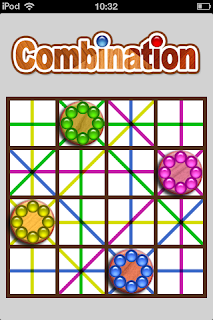
+Christopher Jefferson wrote me some time ago to remind me about his good puzzle game Combination , which is one of my favorites. Unfortunately, after whetting my appetite with news about an upcoming new game, he disappeared into a void. So reviewing this game is all I can do for now. Combination is played on rectangular boards of various sizes. The pieces you control, when placed on the board, fire colored beams in 4 or 8 directions. You can also think of them as Rook, Bishop, and Queen chess pieces. The goal is to place all pieces on the board, avoiding that any piece is hit by a beam of a different color. The pieces must be placed on the white squares. The gray squares allow beams to pass, but you can't put pieces on them. The walls block the beams. So the solution to the above puzzle would be this: One thing that isn't visible above is that the beams don't cross the pieces they hit. This property often needs to be taken advantage of to solve a puzzle. Solving the puzzl...

Review: Fields for iPhone and iPad

Image
Fields by Kevin Langdon is a restyling of the classic Fillomino logic puzzle, which is published by many magazines. I like when developers take their time to rethink how a classic puzzle is played, in order to make it work better on a touch screen. On paper, Fillomino is typically played by filling with lines and numbers a white grid, like this image taken from janko.at shows. This works on a magazine, but it would look pretty boring on an iPhone screen. Fields adds colours, by associating each number with a flower (except for 1 which becomes just rocks). To fill an empty cell, you just drag from a populated cell nearby. The goal is to completely cover the grid with flowers, in such a way that the size of each area matches the numbers given. So in the image below, we want to have 4 sunflowers and 2 violets. One thing that isn't immediately apparent is that the dragging you make doesn't need to be a single motion; so in the case above you can drag right from the 4 to colour ...